Time and attendance tracking that ends in payroll-ready hours.
Built for Philippine shift teams. Staff clock in with a PIN at a shared device or from their own phone. You see who is in, catch lates and overtime, then export a clean DTR at cutoff. No biometric machine to buy.
Starter is a free attendance tracker for teams of 5.
5 employees free · Paid from ₱999/year · No card
See the plans and current pricesOne shift. One clean record.
From the open shift to the cutoff export
During the shift
See who is in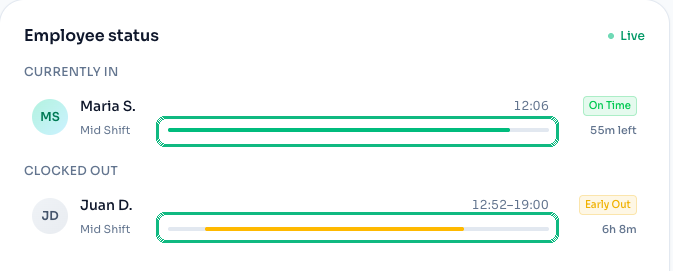
At cutoff
Hours ready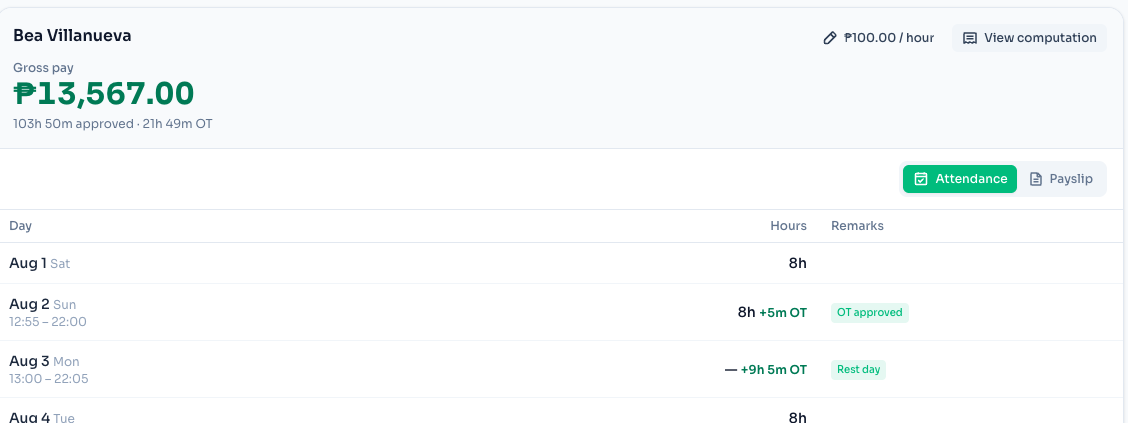
Clock-ins stay tied to the worksite
Require the site Wi-Fi or a location radius on kiosk and personal-phone clock-ins.
Start free. Paid from ₱999/year
Your first 5 employees cost nothing and need no card. Upgrade only when the team grows.
Clear terms. Support included.
Privacy and service terms are published before sign-up, and email support starts on the free plan.
From the first clock-in to a DTR you can send.
One browser-based record replaces the paper logbook, biometric handoff, “time in” group chat, and the spreadsheet someone retypes at every cutoff.
Add your location and staff
Create the location, add employees, and give each one a PIN. No hardware order, no site survey, and no import template to fill in first.
Staff clock in and out
On a shared device, such as a spare tablet or phone, or from their own phone if they work off site. Lates, breaks, and overtime are counted as the shift runs, against the schedule you set.
Approve, then export
Overtime, leave, and correction requests queue up for you to approve. At the cutoff, export a payroll-ready timesheet, split by day type if you turned that on, and send it to whoever runs your payroll.
Two ways your team clocks in.
Pick one per location, or run both. The rules and the timesheet are the same either way.
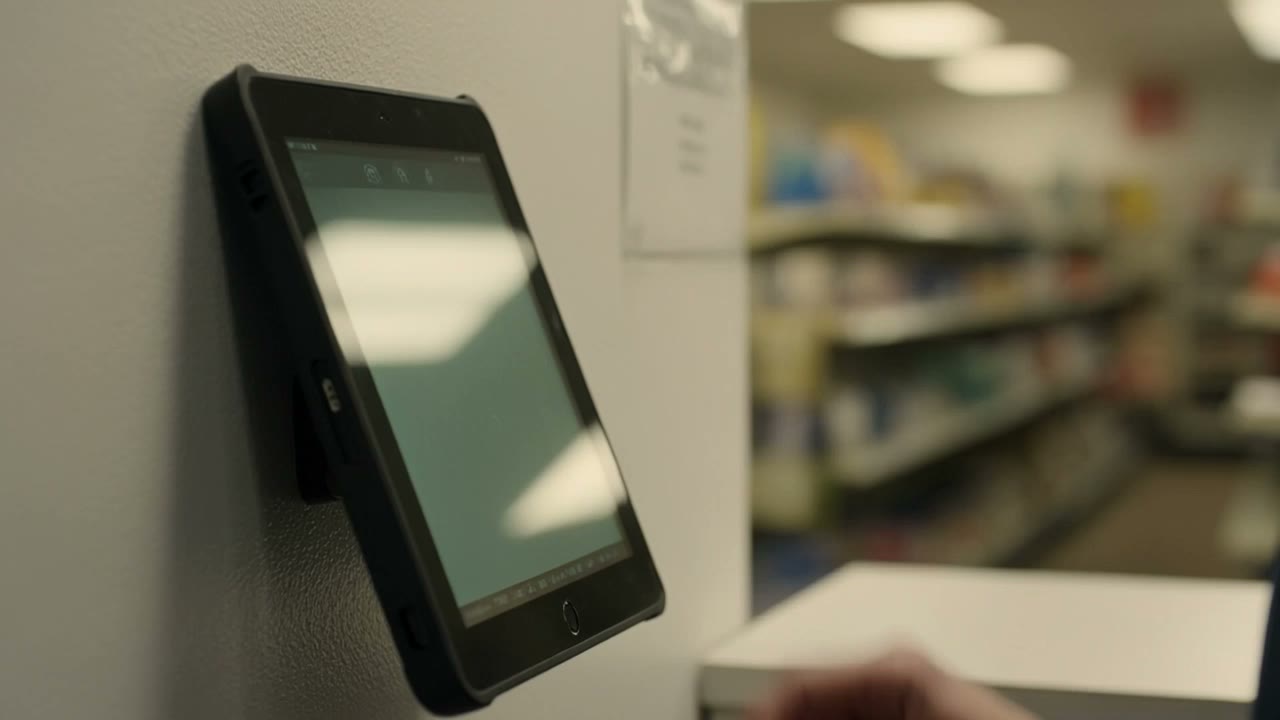
Shared device
Put ClockTap on any spare phone, tablet, or laptop at the counter. Each employee taps their PIN, so one screen serves the whole shift without signing anyone into a personal account.

Their own phone
Staff sign in on their own device. This fits guards, merchandisers, field crews, and agency staff working beyond a fixed counter.
A PIN plus a site lock
A PIN can be shared, so ClockTap also lets you require the worksite's Wi-Fi or a location radius. Both controls work with the kiosk and personal phones, keeping accepted clock-ins tied to the workplace.
See it work with your own team.
Add your first location and up to 5 employees free. There is no device to order and no sales call before your first clock-in.
It knows Philippine pay rules.
This is where a general-purpose global time tracker stops being useful. A regular holiday, a special non-working day, and a special working day are three different rates here, and night hours add another 10% on top of whichever one applies. Turn on holiday tracking and the pay-category breakdown for a location, and ClockTap sorts hours into those buckets as they are worked, so the export comes out already split.
Ordinary working day
- First 8 hours
- 100%
- Overtime
- 125%
- Not worked
- Unpaid*
Special working day
- First 8 hours
- 100%
- Overtime
- 125%
- Not worked
- Unpaid*
Rest day
- First 8 hours
- 130%
- Overtime
- 169%
- Not worked
- Unpaid*
Special (non-working) day
- First 8 hours
- 130%
- Overtime
- 169%
- Not worked
- No work, no pay*
Special (non-working) day on a rest day
- First 8 hours
- 150%
- Overtime
- 195%
- Not worked
- No work, no pay*
Special working day on a rest day
- First 8 hours
- 130%
- Overtime
- 169%
- Not worked
- Unpaid*
Regular holiday
- First 8 hours
- 200%
- Overtime
- 260%
- Not worked
- 100% if eligible
Regular holiday on a rest day
- First 8 hours
- 260%
- Overtime
- 338%
- Not worked
- 100% if eligible
| Kind of day | First 8 hours | Overtime hours | Not worked |
|---|---|---|---|
| Ordinary working day | 100% | 125% | Unpaid* |
| Special working day | 100% | 125% | Unpaid* |
| Rest day | 130% | 169% | Unpaid* |
| Special (non-working) day | 130% | 169% | No work, no pay* |
| Special (non-working) day on a rest day | 150% | 195% | No work, no pay* |
| Special working day on a rest day | 130% | 169% | Unpaid* |
| Regular holiday | 200% | 260% | 100% if eligible |
| Regular holiday on a rest day | 260% | 338% | 100% if eligible |
Overtime means any hour past the eighth. Night differential covers hours worked between 10 PM – 6 AM. *Subject to paid leave, monthly-paid arrangements, company policy or practice, a CBA, the employment contract, and statutory coverage or exemptions.
Rates follow the Labor Code as summarised in the DOLE Handbook on Workers' Statutory Monetary Benefits. For covered employees, a company policy or collective agreement can pay more than these figures, and statutory coverage and exemptions can change what applies. This page is a planning aid, not legal or accounting advice.
Work the numbers yourself with the free holiday pay calculator , or check the dates on this year's Philippine holiday calendar .
What you get.
PIN clock-in and clock-out
A shared device in any browser, or each employee on their own phone. Nothing to install on either.
Location and network locks
Refuse a clock-in that did not come from the site's Wi-Fi, or from inside a radius around it.
Overtime and leave approvals
Overtime, leave, and correction requests queue for a supervisor, and only approved ones count toward the totals you export.
Philippine holiday calendar
Regular, special non-working, and special working days, set per location once you turn holiday tracking on. Pro and Max.
Shifts and schedules
Plan the week on one grid. A late arrival only means late against the shift the person was assigned.
Multiple locations
Every branch on one dashboard, each with its own kiosk, rules, and supervisors.
Payroll-ready export
An Excel or CSV timesheet of approved hours for your cutoff. Switch on the pay-category breakdown to split night hours and day types out too.
Attendance dashboard
Who is in right now, who is late, and where the overtime is going, without opening a spreadsheet.
Roles and access
Owners see everything. Supervisors see their location. Staff see their own record and nothing else.
Start free. Upgrade when the team grows.
Flat per plan, per year, in pesos, not per employee per month. Hiring does not change the bill until you pass the plan's employee limit.
Starter
For small teams running one shared device and basic attendance workflows.
Free
Up to 5 employees · 1 location
Pro
Early SupporterFor growing teams with up to 5 locations.
₱999 /year
Current Early Supporter rate · Standard ₱2,990/year
Up to 50 employees · 5 locations
Max
Early SupporterFor agencies and groups with up to 25 locations. Same features as Pro.
₱2,990 /year
Current Early Supporter rate · Standard ₱6,990/year
Up to 250 employees · 25 locations
The prices above are what checkout charges today. Paid plans are on the current Early Supporter rate; their standard prices are shown for comparison.
How it compares.
Every comparison below uses published prices where the vendor publishes them, and says so plainly where they do not.
ClockTap vs Sprout Solutions
Full HR and payroll suite · Philippines
ClockTap vs Jibble
Global time tracker · free tier
ClockTap vs PayrollHero
Attendance + payroll · Philippines
ClockTap vs Clockify
Global time tracker · per seat
ClockTap vs Fareclock
Kiosk time clock · face recognition
ClockTap vs PAYDAY.PH
Payroll + attendance · Philippines
ClockTap vs ELID Technology
Biometric hardware + software · Philippines
Who runs it.
Retail stores and multi-branch operators
One kiosk per branch, every branch on one dashboard. The owner sees all of them without visiting any of them.
Restaurants, cafés, and food service
Split shifts, rest days, and a lot of overtime on holidays. The rate table does the arithmetic you would otherwise do by hand.
Clinics and service businesses
Small teams on fixed schedules, where the only real question at the cutoff is who was late and by how much.
Manpower agencies and deployed staff
Guards, merchandisers, and crews at client sites clock in from their own phones, locked to a radius around the location they clock in for. Each fenced site is its own location: 5 on Pro, 25 on Max.
Common questions.
It records when employees clock in and out, then turns those timestamps into worked hours, lates, undertime, breaks, overtime, and absences. For a Philippine team, the useful output is a Daily Time Record or cutoff timesheet that is ready for payroll review. ClockTap handles that attendance layer without trying to replace the payroll system that computes statutory deductions and filings.
The right one is the cheapest tool that still knows the pay rules you actually run on. Some global trackers let you build holiday and overtime rules yourself, which works if you are willing to configure and maintain them. Local HR suites know the rules but bundle payroll and an HRIS you may not need. ClockTap sits between them: the three Philippine day types as built-in categories and a night-differential window on 10 PM to 6 AM, at a flat yearly peso price, with a free tier for your first 5 employees and the day types on Pro.
Not to record attendance. A fingerprint reader ties a clock-in to a person; ClockTap ties it to a place, with an employee PIN plus two locks you control. The clock-in must come from the location's own network, or from inside a radius around it. For a lot of shift teams that is the part that matters, and it means no hardware to buy. Be clear about the trade: a PIN can be shared and a fingerprint cannot, and a terminal can also unlock a door, which software cannot.
Yes. Set the location to personal-phone mode, then switch on each employee who may clock in from their own device. A branch with a counter can run a shared device while a deployed crew clocks in from personal phones, both under the same rules and feeding the same timesheet. The phone option is what makes guards, merchandisers, and field crews trackable at all.
Yes, on a paid plan. Turn holiday tracking on for a location and it tracks the three categories separately: regular holiday, special non-working day, and special working day. It also adds night differential for hours worked between 10 PM and 6 AM. Hours then land in the right bucket as they are worked, so the export comes out already split. Holiday day types are a Pro and Max feature; Starter covers the kiosk, attendance, and approvals.
No, deliberately. ClockTap counts hours and prices them so you can hand the result to whoever runs your payroll: an accountant, a spreadsheet, or payroll software. It does not compute SSS, PhilHealth, Pag-IBIG, or BIR deductions and does not file anything. That is what keeps it cheap and quick to set up.
Starter is free for 5 employees at 1 location, with the kiosk included. Current Early Supporter pricing is Pro at ₱999, Max at ₱2,990. Standard rates are Pro at ₱2,990, Max at ₱6,990. The price is flat per plan, not per employee, so hiring does not change the bill until you pass the plan's employee limit.
ClockTap runs in a browser and needs a connection to record a clock-in. For a shop with unreliable internet the practical fallback is a phone hotspot on the kiosk device, and a supervisor can file a correction request for any clock-in that was missed. It goes through the same approval queue as everything else.
No. ClockTap does not read third-party terminals. It replaces the device rather than talking to it. If you are committed to existing hardware, a vendor that reads it, such as PAYDAY.PH or ELID, fits better than we do.
It is self-serve, so it depends on how many employees you type in. Create the location, add your employees, hand out PINs, and open the kiosk on any spare device. There is no installation, no site survey, and no sales call to wait for.
More detail lives in the documentation : setup, kiosk pairing, approvals, and exports, step by step.
Start tracking attendance today.
Free for 5 employees. No hardware to buy, and no card. Sign up and the next shift can clock in.